MRC PDF Kompressor 4.1.0
Professional document compression with Mixed Raster Content technology – up to 95% size reduction, BSI TR-Resiscan compliant.
Download now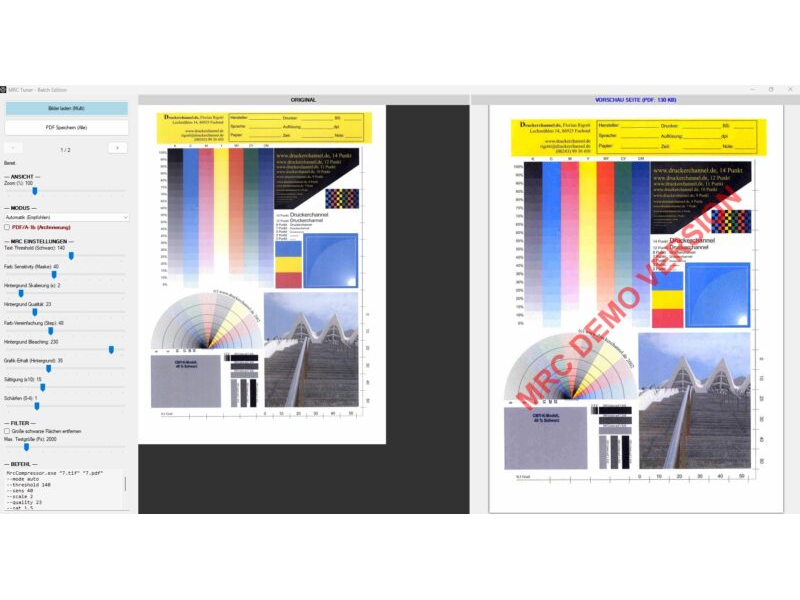
Description & documentation
Professional document compression
The MRCCompressor is a powerful tool for converting scanned images (TIF, JPG, PNG) into extremely compact, audit-proof PDF files.
By using the Mixed Raster Content (MRC) method, the software separates text from image backgrounds. The result is documents that are up to 95% smaller than the original, while keeping the text crisp and perfectly legible.
This version uses a newly developed hybrid engine that requires no expensive commercial licences and delivers results comparable to the market leaders.
What's new
Version 4.1.0 (September 2026)
- The "Text 2" and "Graphic 2" profiles now run the same pipeline as "Text" and "Graphic" – previously bleaching, posterisation and silhouette had no effect in "Text 2", and "Graphic 2" incorrectly received a text mask.
- Considerably lower memory usage: text mask detection without integral images, inpainting with a front-line method, memory released per page (A3 batch: roughly 5 GB → 2.5 GB), with identical results.
- Interface: PDF generation now runs in the background with progress display and cancel; sliders also take effect in automatic mode, new "Load profile values" button.
- Command line: folders and wildcards as input, per-page progress, summary (KB before/after, time), exit codes, new
--dpiparameter, protection against overwriting input files, time limits for jbig2/potrace. - Images without DPI information no longer produce oversized pages.
- Log and profiles fall back to
%LOCALAPPDATA%\MrcCompressorif the program folder is write-protected; log rotation from 5 MB. - Factory setting "Text": vectorisation off (pattern-safe even without the supplied
mrc_profiles.xml). - Distribution: x64 components only, signing and ZIP via
build-release.ps1, regression test project (MrcCompressor.Regression). - Uniform backgrounds (blank pages, fully bleached text pages) came back from the JPEG2000 encoder with brightness 240 instead of 255, making the page look grey. Such backgrounds are now encoded losslessly (approx. 250 bytes).
- "Text 2" profile: edge optimisation 30 → 0 (no more smearing along lines, coloured plan pages roughly 25 % smaller).
- Interface: "Info & licence" row with info dialog (version, licence model, third-party notices) and a link to the product page kreutzweb.de.
Version 4.0.1 (September 2026)
- Command line: new
text2/image2modes; new parameters--jp2depth,--posterize,--edgelum,--edgesatplus off-switches for all profile options. - Command line: profiles from
mrc_profiles.xmlnow also apply with a fixed mode; parameters given also take effect in automatic mode. - Interface: the displayed command line for "Text 2" / "Graphic 2" corrected, JP2 colour depth and silhouette values are now included in the output.
- Command line:
--helplists all options; output and warnings appear in the calling console window.
Version 4.0 (July 2026)
- Colour text layers: coloured headings, stamps and logos stay sharp and true to colour (up to 4 automatically detected colour layers at 300 DPI).
- JBIG2 compression of the text mask (pattern-safe, no character substitution); optional symbol mode for maximum compression (
--jbig2symbols). - Smart Inpainting now fills text areas with the real paper colour instead of white – no more light halos on coloured or grey paper.
- Multi-page TIFF files are supported (each page becomes its own PDF page).
- Considerably faster: parallel page processing and optimised filters (batch processing about 40–50 % faster, correspondingly more on multi-core CPUs).
- PDF/A-1b output is now fully standard-compliant.
- Small dark elements (bullet points, ticked checkboxes, punch holes) are reliably preserved.
- Preview without freezing (background computation) and new switches in the interface for colour text layers, Smart Inpainting, edge silhouette and JBIG2 symbol mode.
- Download size halved (31 instead of 62 MB); new licence model (PolyForm Small Business License 1.0.0).
The highlights (features)
- Extremely high compression: reduces file sizes from, e.g., 5 MB to under 100 KB (in text mode). In internal comparison tests more compact than leading commercial MRC solutions – at the same legibility.
- BSI TR-Resiscan compliant: pattern-safe method without JBIG2 symbol matching. No characters are replaced or altered – ideal for replacement scanning.
- NEW – colour text layers: coloured headings, stamps, logos and markings are automatically detected and preserved as separate, crisp 300-DPI layers in their original colour, instead of blurring into the compressed background.
- Smart Inpainting: reconstructs the background behind the text with the real paper colour – no artefacts, better compression.
- Background Bleaching: removes grey haze and noise for pure-white backgrounds.
- PDF/A-1b support: creates long-term archivable files to ISO standard.
- Multipage TIFF: multi-page TIFF files are automatically converted into multi-page PDFs.
- Split-view interface with real-time preview (original vs. result), synchronised zoom and layer view – the preview computes in the background without blocking operation.
- Batch & CLI: fully automatable via the command line, now with parallel page processing for high throughput.
How it works
The tool splits the scanned image into several layers (Mixed Raster Content):
- Text mask: the black text is extracted at high resolution (300 DPI) and compressed space-efficiently as JBIG2 – using a pattern-safe method without character substitution (CCITT G4 as fallback).
- Colour text layers (new): coloured text, stamps and logos are grouped by colour and embedded as separate, crisp layers in their original colour.
- Background layer: paper structure and images are processed separately, smoothed and efficiently compressed as JPEG2000 or JPEG.
In the final PDF these layers are overlaid exactly – the result is a fraction of the original size with full legibility.
Instructions & operation
1. Graphical interface (GUI)
Start MrcCompressor.exe for interactive mode:
- Load one or several images.
- Use the sliders on the left to find the perfect balance between quality and size.
- Or: choose between "Text Optimised" (for invoices/letters) and "Graphic Optimised" (for certificates/photos).
- Copy the command generated at the bottom left for your scripts.
- Save the generated PDF file.
2. Command line (CLI)
Ideal for servers or batch scripts.
Syntax: MrcCompressor.exe "Input.tif" "Output.pdf" [options]
Example:
MrcCompressor.exe "Scan01.tif" "ArchivScan01.pdf" --mode text --pdfa
Note: every mode starts with the matching profile from mrc_profiles.xml, exactly like the interface. Parameters you specify override the profile – including in automatic mode after page detection. The command line shown in the interface therefore reproduces the preview exactly. MrcCompressor.exe --help lists all options in the calling window.
Inputs: folders and wildcards (*.tif) are allowed, with natural sorting (page2 before page10). The output is the last argument ending in .pdf; if omitted, <input>.pdf or <input>_batch.pdf is used. Input files are never overwritten.
Exit codes: 0 = ok, 1 = error / no page, 2 = usage error (for scripts).
Important parameters:
- --mode [auto|text|image|text2|image2]: selects the algorithm (automatic, text bleaching, image preservation, or the corresponding "2" variant with adjusted profile defaults).
- --pdfa: creates a PDF/A-1b file (requires srgb.icc in the folder).
- --threshold [0-255]: sensitivity of text detection (default: 150).
- --noblobs: automatically removes large black borders from the text mask.
When called via the command line (CMD/PowerShell), the following parameters are available:
Parameter overview for MRC Compressor
This overview describes all available settings of the MRC Compressor. They can be controlled both via the user interface (GUI) and via the command line (CLI).
The settings are stored in the file mrc_profiles.xml.
Main settings
| Setting | CLI parameter | Explanation | Default |
|---|---|---|---|
| Mode | --mode [auto/text/image/text2/image2] | Controls the processing strategy. Auto: automatically detects whether a page is text or graphic. Text: optimised for sharp text, removes background details. Image: preserves colours and photos, but needs more storage space. Text 2 / Graphic 2: variants with adjusted profile defaults (see mrc_profiles.xml) – since 4.1.0 they run the same pipeline as "Text" and "Graphic". | Auto |
| Auto-Detect Threshold | --autothresh [0-100] | Sensitivity threshold for auto mode. Specifies what percentage of the page must be "colourful" for it to be recognised as graphic/image. Low (e.g. 2%): even small coloured logos switch to graphic mode. High (e.g. 15%): only real photos switch over; documents with colour accents stay in text mode. | 8% |
| PDF/A | --pdfa | Creates a PDF/A-1b compliant file (for long-term archiving). Disables transparencies. | Off |
MRC segmentation (mask & text)
| Setting | CLI parameter | Explanation |
|---|---|---|
| Text Threshold | --threshold [0-255] | "Where does text end, where does background begin?" Determines how dark a pixel must be to be recognised as text. 0 = pure black only, 255 = everything. A higher value also detects lighter/grey text, but risks recognising dirt as text. |
| Colour Sensitivity | --sens [0-100] | Determines how sensitively the mask ignores colour differences. A high value merges similar colours, which makes the mask cleaner ("less blotchy"). |
| Remove blobs | --noblobs | When active, large black areas (e.g. black borders from scanning) are automatically removed and assigned to the background. |
| Max. text size | --blobsize [px] | Maximum size (in pixels) an object may have to still count as "text". Anything larger is treated as graphic/background. |
Background optimisation
| Setting | CLI parameter | Explanation |
|---|---|---|
| Background scaling | --scale [1-10] | Strongest factor for the file size. The background is stored downscaled. 1 = original: best quality, large file. 3 = standard: background has 1/3 resolution (at 300 dpi that corresponds to 100 dpi). Usually completely sufficient for text documents, since the sharp text lies on top. |
| Background quality | --quality [0-100] | Compression quality of the background layer (JPEG2000 or JPEG). Low (<30): saves space, but creates "block" artefacts. High (>70): hardly any artefacts, larger file. |
| Graphic preservation | --bgsens [0-200] | Determines how much detail should be kept in the background. A low value "washes out" the background more (good for text scans), a high value preserves structures (good for patterned backgrounds). |
| Blur | --blur [0-5] | Applies a blur over the background. Helps to remove noise and halftone dots in the paper. |
| Saturation | --sat [0.0-5.0] | Adjusts the colour saturation of the background. 0.0: black and white (greyscale). 1.0: original. >1.0: boosts colours (good for pale scans). |
| Background bleaching | --white [0-255] | "White point": all brightness values above this are turned to pure white (transparent). Ideal for removing grey paper or show-through from the back ("paper cleaning"). |
Vectorisation
| Setting | CLI parameter | Explanation |
|---|---|---|
| Vectorise | --vectorize | Tries to convert the recognised text into real vector graphics instead of pixels. Advantage: infinitely sharp when zooming. Disadvantage: can deform letters on poor scans ("O" becomes "Q"). This makes the scan no longer pattern-safe / TR-Resiscan compliant! |
| Keep as vector | --keepvector | Stores the vectors directly in the PDF (larger file, best quality). If disabled, the vectors are rasterised (smaller file). |
| Bake into BG | --bakevector | Renders the vectors back into the background layer. Uses vectorisation only to "smooth" the edges. |
Filters & effects
| Setting | CLI parameter | Explanation |
|---|---|---|
| Sharpen | --sharpen [0-20] | Re-sharpens the background after downscaling to keep details legible. |
| Edge optimisation | --edge [0-30] | Artificially enhances edges (unsharp masking), e.g. to make signatures stand out more clearly on the background. |
| Colours (Posterize) | --posterize [2-128] | Reduces the number of colours in the background (e.g. to 16 colours). Creates a "comic look" and saves a huge amount of storage, since areas of the same colour compress better. Reliably applied via the CLI since 4.0.1. |
| Watermark (only available in mrc_profiles.xml) | Writes a text in semi-transparent red over the finished PDF. |
New options in version 4.0
| Setting | CLI parameter | Explanation |
|---|---|---|
| JBIG2 symbol mode | --jbig2symbols | Enables JBIG2 symbol matching for maximum compression – up to 65% higher compression rate in text mode. Caution: not pattern-safe / not TR-Resiscan compliant – only use when audit-proof archiving is not required. |
| Colour text layers off | --nocolorfg | Disables the colour text layers; coloured text then ends up in the compressed background. |
| Inpainting off | --noinpaint | Disables Smart Inpainting; text areas are filled hard with white instead of the real paper colour. |
| Edge silhouette off | --nooutline | Disables the edge silhouette in the background – produces smaller files. |
New options from version 4.0.1 / 4.1.0
| Setting | CLI parameter | Explanation |
|---|---|---|
| JP2 colour depth | --jp2depth N|max | JPEG2000 colour depth (number of colours) for the background. max = unlimited. |
| Silhouette brightness | --edgelum N | Edge silhouette: background brightness. |
| Silhouette saturation | --edgesat N | Edge silhouette: colour protection (saturation). |
| Force DPI | --dpi N | Resolution for the page layout with images that carry no DPI information. If omitted, 300 DPI is assumed automatically for scan-typical pixel dimensions (new in 4.1.0). |
| Keep blobs | --keepblobs | Counterpart to --noblobs – large black areas stay in the text mask. |
| No cropping | --nocrop | Disables automatic cropping. |
| No vectorisation | --novectorize | Counterpart to --vectorize. |
| Do not keep vectors | --nokeepvector | Counterpart to --keepvector. |
| Do not bake vectors | --nobakevector | Counterpart to --bakevector. |
Syntax
The call is made via the command line (CMD/PowerShell)
MrcCompressor.exe "Input file" "Output file" [parameters](If no output file is specified, the input file is saved with the extension .pdf in the same folder.)
Archiving (PDF/A):
MrcCompressor.exe "Scan.tif" "Archiv.pdf" --pdfaSystem requirements
- Windows 10 / 11 (64-bit) – since version 4.1.0 only x64 components are shipped
- Microsoft .NET Framework 4.8 or newer
- Visual C++ Redistributable (x64)
Licence & costs
Free for private individuals and small businesses – under the PolyForm Small Business License 1.0.0: free use, copying and distribution for private individuals, associations, educational institutions and organisations with fewer than 100 people and under USD 1 million in annual revenue.
Licensable only above this size: larger companies need a paid licence for business use (enquiries via kreutzweb.de). The full licence text is included as LICENSE.txt; notes on the included open-source components in THIRD-PARTY-NOTICES.txt.
Download
Free for private individuals and small businesses (PolyForm Small Business License). Provided "as is" without warranty.
Download mrc-pdf-kompressor.zip (approx. 31 MB)Or via winget (Windows Package Manager, listed in the official repository since October 2026): winget install DanielKreutz.MRCPDFKompressor
Installation: download the ZIP, unzip it into any folder and run MrcCompressor.exe – done. No deep installation into the system needed. Project page with README on GitHub.
Security & verifiability
MrcCompressor.exe is digitally signed with a certificate
issued to Daniel Kreutz (Certum) – Windows shows the publisher on launch.
You can also verify your download with the SHA256 checksum (command prompt:
certutil -hashfile mrc-pdf-kompressor.zip SHA256).
Independently scanned at VirusTotal:
A note for reviewers: the package ships the open-source tools jbig2enc (jbig2.exe with Leptonica) and potrace as well as the libraries PDFium and iTextSharp LGPL unmodified. These are not signed by their authors – some scanners flag unsigned files on principle. The remaining components (Magick.NET, SkiaSharp, BouncyCastle, .NET libraries) carry their vendors' signatures. Using the checksums above you can verify at any time that your download is unaltered.
Did this tool help you? Treat me to a coffee via PayPal