Passwort-Safe
Passwords and one-time codes in a KeePass file – on your own computer, optionally synchronised with your own WebDAV server. No account, no subscription and no cloud service.
Go to download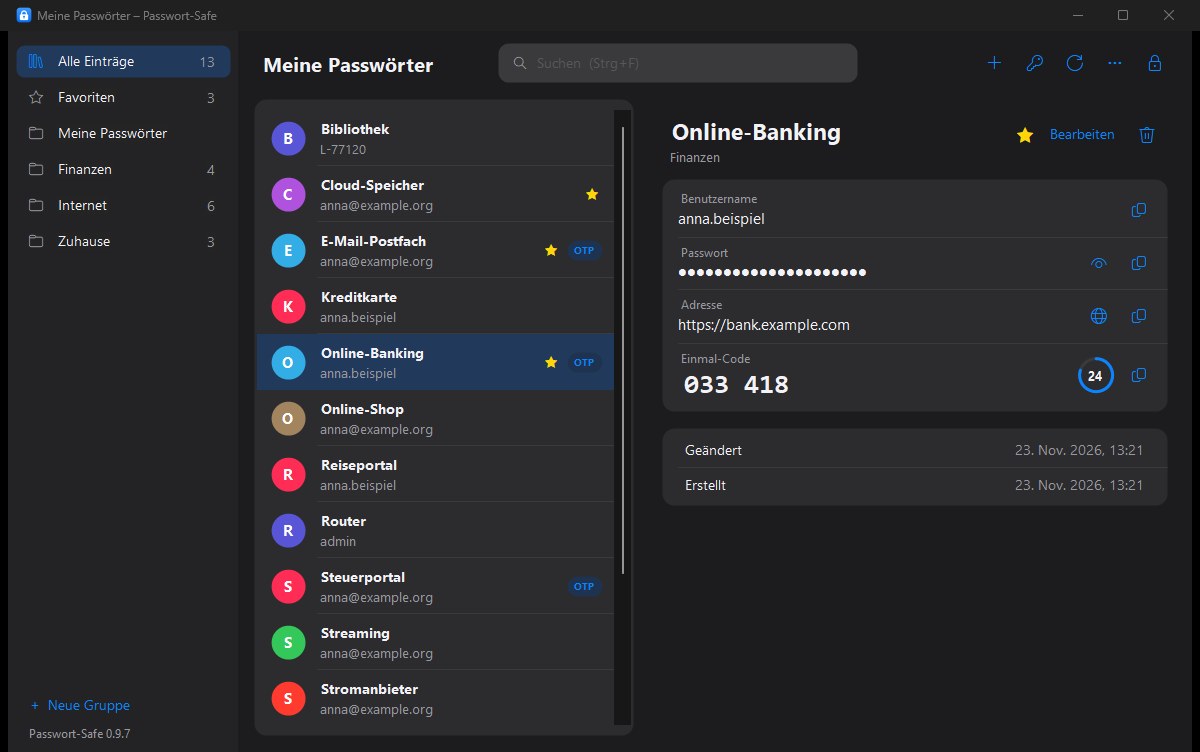
What the program does
A password manager that stays with your own data – and is still convenient to use. The user interface is in German.
Open file format
The database is an ordinary KeePass file (KDBX 4). It can be opened with KeePass, KeePassXC or KeePassium at any time – nobody is tied to this program. Existing files in KDBX 3.1 and 4 are read, including key files.
One-time codes
Time-based one-time codes (TOTP) are shown right with the entry. During setup the program reads the QR code from the screen, so the secret key does not have to be typed.
Your own server instead of a cloud
If wanted, the program synchronises the database with a WebDAV server of your choice. Changes made on several devices are merged, without conflict copies. Without a server it works purely locally.
Filling in the browser
The extension for Chrome, Edge and Firefox fills user name, password and one-time code on click. It only talks to the program on the same computer.
Typing into other programs
With Ctrl+Alt+A Passwort-Safe types the login data into the window in the foreground, with Ctrl+Alt+O only the one-time code – handy for programs without a browser, such as VPN clients or signing software.
Windows Hello
Unlock with face, fingerprint or PIN. The master password is never stored and keeps working.
Strong passwords
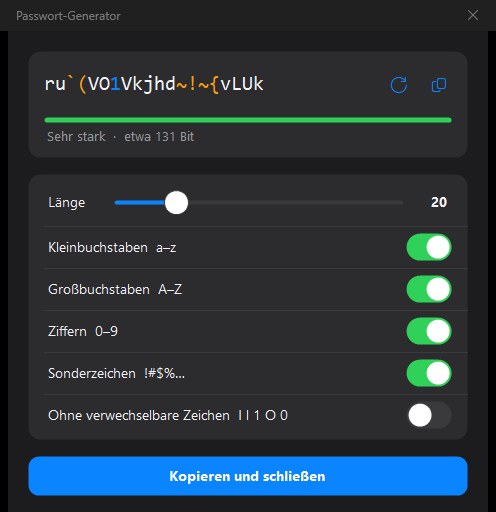
The generator creates passwords with selectable length and character sets and shows their strength.
Import from the browser
Takes over saved passwords as a CSV export from Google Passwords, Chrome, Edge, Firefox, Bitwarden or KeePassXC. Duplicate logins are skipped.
Description
Passwort-Safe manages login data in an encrypted file on your own computer. There is no user account, no background service and no connection to me: the program only talks to the WebDAV server that is set up for it – and without sync to nobody.
In everyday use
- Favourites and search: frequently used entries get a star; the search finds entries by title, user name, address, notes and tags.
- One-time code from the notification area: a right click on the icon next to the clock copies the code of a favourite without opening the window.
- Selection in a sensible order: if several entries match, the most recently used come first, then favourites, then entries with a one-time code.
- History and recycle bin: earlier versions of an entry can be restored, deleted items go to the recycle bin first.
- Backups: before every save the program stores a copy of the database and keeps the last 20.
Security
- Master password: is not stored anywhere. Without it (or Windows Hello on this computer) the database cannot be opened.
- Automatic locking: after an adjustable time without input and when Windows is locked; optionally also when minimised.
- Clipboard: copied passwords and codes disappear again after an adjustable time and do not appear in the Windows clipboard history.
- Browser extension: connects once, with confirmation and a comparison code in the program. Passwords are only given out for entries that match the open page, and filling happens only on click.
- Typing: only into windows that are explicitly assigned to an entry or chosen by hand. If the window changes in the meantime, the program stops.
- No analytics: no statistics, no tracking, no advertising. Details are in the privacy policy.
Sync with your own server
Under “Datenbank vom Server öffnen” (open database from server) the address of the .kdbx file (https), user and password are all that is needed. The program keeps a local copy and synchronises it after unlocking, after every change and once a minute. If two devices have changed the database at the same time, both versions are merged. If the server cannot be reached, the program keeps working with the local copy.
Setting up the browser extension
The extension needs the installed program – it is only the link between the browser and Passwort-Safe. The easiest way is from within the program: “Browser einrichten” (menu “…”) guides through the installation for Chrome, Edge and Firefox and shows the state per browser. The extension can also be fetched directly:
- Chrome: open Passwort-Safe in the Chrome Web Store and choose “Add to Chrome”.
- Edge: open the same page in the Chrome Web Store in Edge. Edge asks once whether extensions from other stores should be allowed; then choose “Get”.
- Firefox (version 140 or later): open passwort-safe-firefox-0.4.1.xpi in Firefox and confirm adding it. If Firefox only downloads the file: add-ons manager (
about:addons) → gear icon → “Install Add-on From File…”. The file is signed by Mozilla and is also included in the setup.
On the first connection Passwort-Safe asks for confirmation and shows a comparison code that must be the same in the browser and in the program.
System requirements
- Windows 10 (version 2004 or later) or Windows 11, 64-bit
- No additional runtime needed – everything required is part of the program
- For Windows Hello: Hello set up (face, fingerprint or PIN)
- For sync: your own WebDAV server with https
Download
Free for private and commercial use. No warranty for freedom from defects. The licences of the components used are included with the program (“Über Passwort-Safe”).
Setup for Windows
Installs the program for the signed-in user, without administrator rights, with a Start menu entry and uninstallation via Windows Settings. If wanted, Passwort-Safe starts in the notification area at sign-in. To update, simply run the new setup – databases and settings are left untouched.
Download setup (approx. 51 MB)Setup, program and core are digitally signed with a certificate issued to Daniel Kreutz (Certum) – Windows shows the publisher at start.
Did this tool help you? Treat me to a coffee via PayPal