SWX-Auftrag
Simple order management for small and medium-sized businesses – invoices, customers, articles, repair orders and XRechnung in one package.
Download now
Description & documentation
The complete solution for smooth order management - full version
SWX-Auftrag is THE simple order-management software for small to medium-sized businesses.
With this software your company keeps its invoices under control. It stands out for ease of use, high flexibility and range of functions:
Creating invoices, quotes, delivery notes, orders, cost estimates, reminders, credit notes and much more
Repair module for repair businesses
Article and customer management
Import and export of article and customer data
Network-capable for any number of employees
User management
Reports
Form editor for a unique layout of your orders
Generate an X-Rechnung from an invoice
SWX-Auftrag runs under Windows.
"SWX-Auftrag" can now create XRechnungen. XRechnung is a standard for electronic invoicing in the form of an XML data set that contains the invoice information in structured form.
A finished invoice in 3 clicks!
Select customer - add articles - print invoice. DONE!
Customers and articles do not have to be created before writing orders. They can simply be added to the master data while an order is being written.
Repair order!
Repair orders are handled very easily with the repair module. You record the customer and device data or simply take it over from the existing master data. When the repair is complete, an invoice can be created from the repair order with a single mouse click.
Form editor
With our extensive form editor you can create a unique layout for your invoices and orders. It is easy to use. You can show or hide every element.
Article and customer management
Here you can store and edit all important data, such as names, phone, description, tax, price, purchase price or stock level.
Likewise, a value can be entered in the reorder-level field to define from when you want to be notified if the stock falls below a certain quantity.
Import and export
Article and customer data can be imported into SWX-Auftrag from other programs and also exported from the program into a text file.
"Text" is used as the export format to ensure the greatest possible compatibility.
Network-capable
SWX-Auftrag is network-capable. It can switch at any time between the local database (single workstation) and a database on the network.
Any number of users can work with the program at the same time. This way, different locations can also collaborate over the internet.
Video tutorials on YouTube
The following videos open in a new window directly on YouTube:
- SWX-Auftrag – short introduction
- Installing MariaDB as a network database
- Initial database installation & switching from single workstation to network
Simply unpack the folder and start the SWX-Auftrag setup program.
As a system requirement, install the Microsoft SQL Compact database:
Download 32-bit
Download 64-bit
Base: .Net 4.0
SQL Compact: 32bit / 64bit
System requirements
- Microsoft Windows
- .NET Framework 4.0
- Microsoft SQL Compact (32- or 64-bit, installed along with it)
Download
Free for private and commercial use. No warranty for freedom from defects.
Download swx-auftrag.zipDid this tool help you? Treat me to a coffee via PayPal
SWX-Auftrag MySQL Migration
From a single workstation to the network – in just a few minutes.
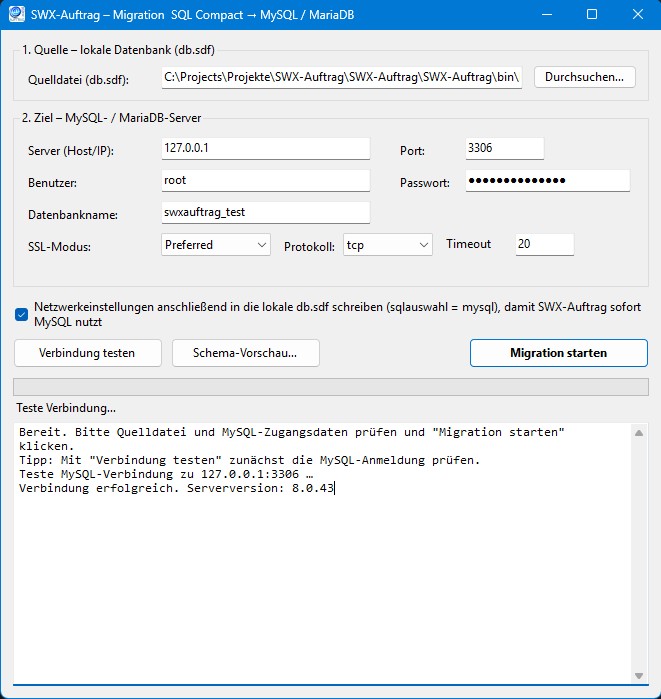
The free migration tool transfers your existing SWX-Auftrag data from the local
database (db.sdf, SQL Server Compact 4.0) to a MySQL or MariaDB server.
This lets you run SWX-Auftrag on multiple workstations together – no data loss,
no need to set everything up again.
Your benefits
- Everything comes along – invoices, customers, items, forms, settings and more, including the original numbering.
- Effortless – enter server and credentials, click "Start migration", done.
- Safe – connection test and schema preview beforehand; the local database remains untouched.
- No installation – small Windows program, just start it.
Three steps
- Enter the credentials of your MySQL/MariaDB server.
- Start the migration – schema and data are transferred automatically.
- Enter the network settings in SWX-Auftrag – and network operation is up and running.
Download: MySQL migration
Standalone Windows program – not integrated into SWX-Auftrag. Free for private and commercial use. No warranty for freedom from defects.
Download swx-sql-migration.zip