Prozessbetrachter
Detailed overview of all system processes – with inactivity detection, CLI mode and PRTG integration.
Download now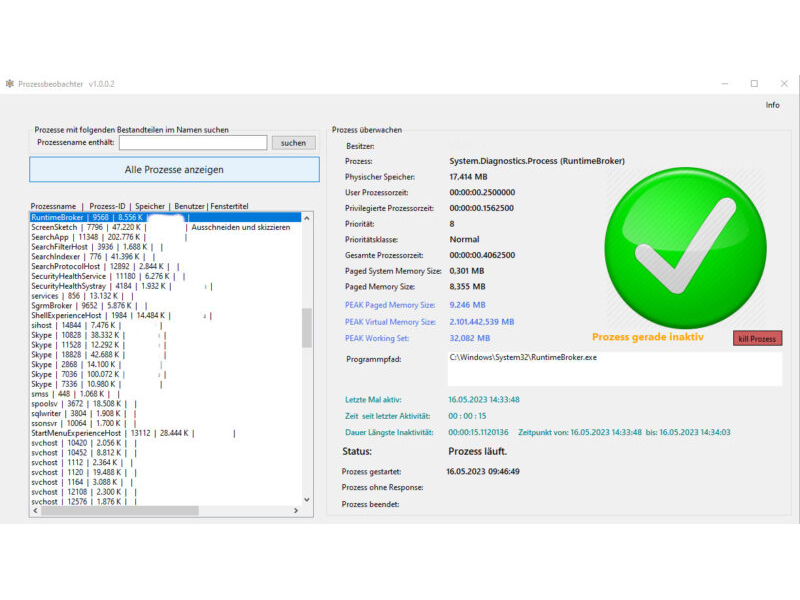
Description & documentation
The Prozessbetrachter is a tool for taking a closer look at a process.
- when was it started
- when is it active
- how much memory does it use
- what is the exact program path
- and much more
The Prozessbetrachter can also be used on the command line to monitor processes, in order to issue a warning when a process is still running but has not been active for a certain time.
For example: a browser is open and is supposed to reload a page every 2 minutes. To monitor this, line 6 of input.txt must contain the entry:
chrome#120
If, after 2 minutes, Chrome has done nothing, the file prozess_output.txt is written to, recording since when the process Chrome.exe has no longer been active.
This is how it's done:
The first parameter is a file name of a text file.
The 2nd parameter is a 0 or a 1. This switches debug mode on (1) or off (0).
So the whole thing looks like this:
ProgrammTest.exe input.txt 0
The file input.txt is structured as follows:
Storage file
D:\Projekte\ProgrammTest\ProgrammTest\bin\Debug\net6.0-windows\prozesse_webview.xml
Output file
D:\Projekte\ProgrammTest\ProgrammTest\bin\Debug\net6.0-windows\prozess_output.txt
Process contains text#Time how long the process may be inactive (in seconds)
chrome#10
The structure (first 5 lines) must be kept this way.
Line 2 specifies a file name that serves as temporary storage (always a *.xml file!)
Line 4 contains the specification of a file into which the result is written.
Each time the program is now started in the console with these parameters, it checks whether a warning is written to the file or not and then exits again. In doing so, it evaluates the temporary storage file (xml).
The prozess_output.txt can then, for example, be further evaluated by other monitoring systems (e.g. PRTG).
Then simply have the Prozessbetrachter called again regularly via the Task Scheduler.
Based on: .NET 6.0
System requirements
- Microsoft Windows
- .NET 6 Runtime
Download
Free for private and commercial use. No warranty for freedom from defects.
Download prozessbetrachter.zipDid this tool help you? Treat me to a coffee via PayPal