MiniEdit
Shows the beginning or the end of very large text and log files within milliseconds – without loading the whole file. With search, word highlighting and a file splitter.
Go to download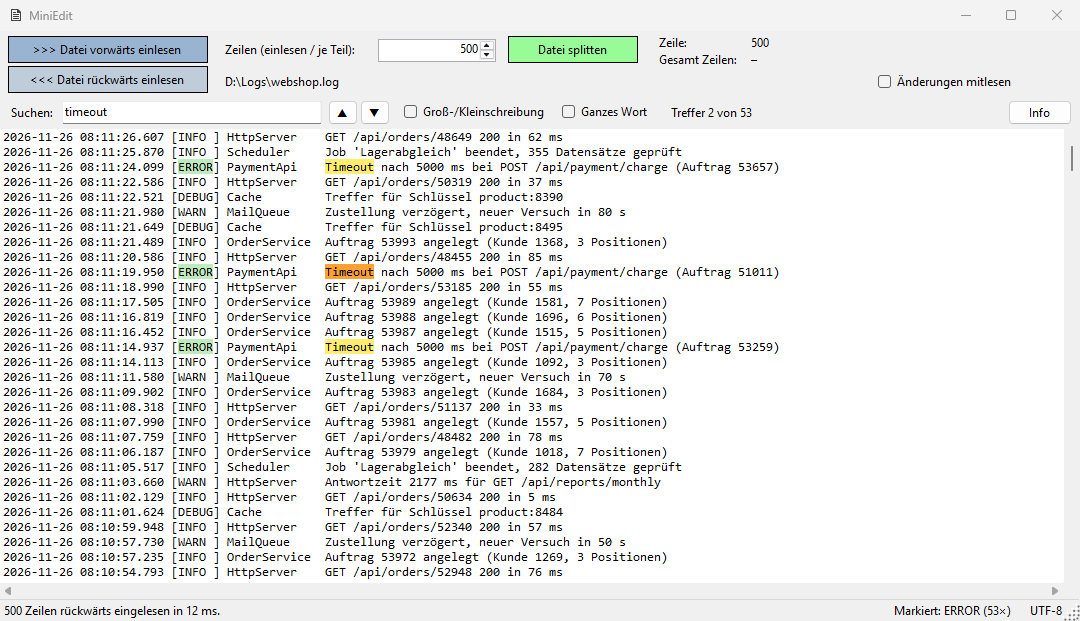
Description & documentation
If you want to check what just happened in a log file of several gigabytes, you usually only need the last few hundred lines. A normal editor first loads the entire file – or gives up. MiniEdit reads the file from the end and shows the last lines immediately, newest first. The first lines can be read from the beginning in the same way.
The file is only read and never modified. This also works for log files that a service or another program is currently writing to.
Features
- Read backwards: the last n lines of a file, with the newest line at the top
- Read forwards: the first n lines; the total number of lines is counted in the background
- Search: all hits are highlighted, with a hit counter (“hit 4 of 125”), optionally case-sensitive and whole word only
- Click a word: one click on a word highlights all identical words in the text and shows how often it occurs
- Follow changes: on request (checkbox “Änderungen mitlesen”), MiniEdit checks the displayed file every second and loads newly written lines automatically – search, highlights and reading position are kept. If the log file is recreated (rotation), MiniEdit reloads it
- Split a file: divides a large file into pieces of n lines each – as a byte-exact copy, so encoding and line endings are preserved
- Encoding: UTF-8, ANSI (Windows-1252), UTF-16 and UTF-32 are detected automatically
- Cancel: every operation can be stopped at any time; whatever has been read so far stays visible
- Select with the mouse, copy to the clipboard, progress display
Speed
Reference values, measured with a log file of 1 GB and 8.8 million lines:
| Operation | Duration |
|---|---|
| Read the last 500 lines | approx. 1 ms |
| Read the last 50,000 lines | approx. 0.05 s |
| Read the last 1 million lines | approx. 0.3 s |
| Count all lines of the file | approx. 0.2 s |
| Split the whole file into 9 parts | approx. 0.5 s |
Searching and highlighting stay smooth even with millions of displayed lines, because only the visible part is ever drawn.
How to use it
- Set the number of lines (default: 500).
- Click “Datei rückwärts einlesen” (read backwards) or “Datei vorwärts einlesen” (read forwards) and choose the file.
- Search the text, click words, or select areas with the mouse and copy them.
| Key / action | Effect |
|---|---|
Ctrl+F | Search box; a selected passage is taken over as the search text |
F3 · Shift+F3 | next · previous hit |
| Click a word | highlight all identical words |
| Double-click | select the word |
Ctrl+C · Ctrl+A | Copy · Select all |
F1 | About the program |
Good to know
- MiniEdit is a pure viewer: text can be selected and copied, but not edited.
- Up to 250 million characters are displayed at once (around 2 million lines, depending on line length).
- When splitting, the parts are created next to the original file, e.g.
server_SPLIT_001.log,server_SPLIT_002.log… - The user interface is in German.
If the programs and tools make your work easier and you use them, support me with a donation.
Thank you!
System requirements
- Microsoft Windows 10 / 11 or Windows Server (64-bit)
- Standalone version: no further requirements
- Small version: .NET 10 Desktop Runtime (x64)
Download
Free for private and commercial use. No warranty for freedom from defects. There are two variants – features and speed are identical.
Standalone version – runs right away
Contains a single MiniEdit.exe that brings everything it needs. Unpack and start – also on servers without .NET installed.
Download standalone version (approx. 42 MB)Small version – requires .NET 10
Just a few kilobytes in size. Unpack the folder and start MiniEdit.exe. It requires the installed .NET 10 Desktop Runtime; if it is missing, the program points this out at startup and links to the download.
Download miniedit.zip (138 KB)Did this tool help you? Treat me to a coffee via PayPal