Logdatei Checker
Continuously monitors log files, detects error patterns and automatically restarts services – with no manual intervention.
Download now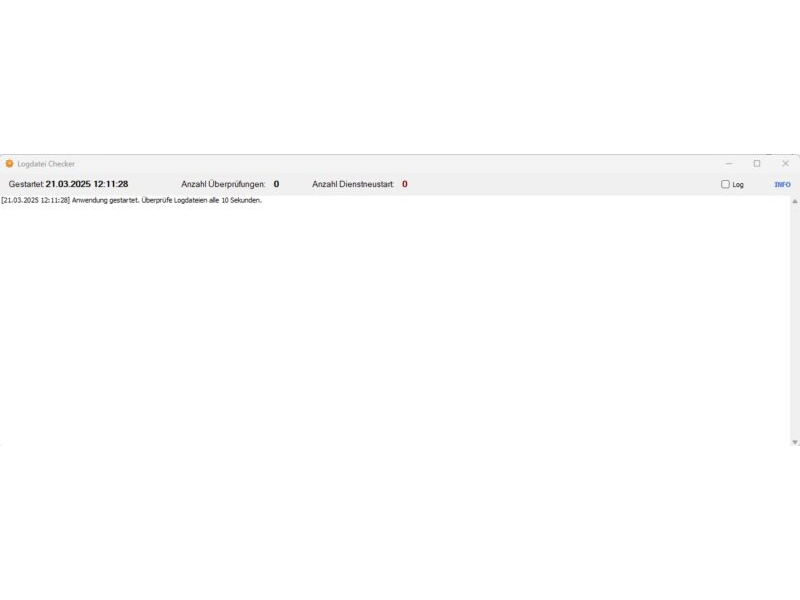
Description & documentation
This application is used to automatically monitor log files and to restart services or also launch programs when certain error messages occur.
It reads its configuration from a config.ini file that contains server-specific settings for the log files to be monitored, search terms for errors and the associated services to restart or the program to start.
Monitor your log files and perform automatic actions on errors!
Features:
- Log file monitoring: continuously monitors log files on defined servers for predefined error messages (search terms).
- Error detection: detects errors in log files by searching for configured search terms.
- Automatic service restart: automatically restarts predefined services when an error is detected in a log file.
- Optional program start before service restart: allows configuration of an optional program/script that is run before the services are restarted (e.g. for additional error handling or notifications).
- Configuration via config.ini file: the monitoring configuration (log file paths, search terms, services, program start) is flexibly controlled via an easy-to-edit config.txt file.
- All kinds of log files can be monitored. Since log files are read from the end, even huge log files can be checked very quickly.
- Detailed log output: the application logs all important events (program start, log file checks, error detection, service restarts, program starts, errors) in a text field in the user interface.
Configuration file (config.ini)
The program is configured via the file config.ini in the same directory as the executable file. The config.ini file has the following format
(an example is included in the zip file):
[Global]
LogCheckInterval=10000 ; Global interval for the log file check in milliseconds (default: 5000)
[Server:SERVERNAME1.domain.de]
[Mandant:MANDANTENNAME1]
NumberOfLines_MANDANTENNAME1=2 ; Number of lines to read at the end of the log files (per client, default: 2)
SearchTerms_MANDANTENNAME1=Fehlerbegriff1,Fehlerbegriff2,Fehlerbegriff3 ; Comma-separated list of search terms (per client)
LogFilePath_MANDANTENNAME1_Solr=SERVERNAME1.domain.de...solr.log ; Path to the Solr log file
LogFilePath_MANDANTENNAME1_xxx=SERVERNAME1.domain.de...xxx.log ; Path to the xxx log file
ServicesToRestart=Dienstname1,Dienstname2 ; Comma-separated list of services to restart on error
Programmstart=C:pfadzuprogrammstart.cmd ; Optional: path to a program/script that is run before the service restart (leave empty if not needed)
[Server:SERVERNAME1.domain.de] ; Repeated server section for the next client on the same server
[Mandant:MANDANTENNAME2]
NumberOfLines_MANDANTENNAME2=…
SearchTerms_MANDANTENNAME2=…
LogFilePath_MANDANTENNAME2_yyy=SERVERNAME1.domain.de...yxc.log
ServicesToRestart=…
Programmstart=
[Server:SERVERNAME2.domain.de] ; Section for the next server
[Mandant:MANDANTENNAME3]
…
Explanations of the sections and parameters:
- [Global] section:
LogCheckInterval: global interval (in milliseconds) at which the log files are checked. Used for all servers unless overridden per server. The default value is 5000 milliseconds (5 seconds).
[Server:SERVERNAME.domain.de] sections:
- Each server whose log files are to be monitored needs its own [Server:…] section.
- SERVERNAME.domain.de: replace this with the actual fully qualified domain name of the server.
- Several [Server:…] sections for the same server name can exist in the config.ini file, each for a different client.
[Mandant:MANDANTENNAME] sections:
- Each client whose log files are to be monitored on the respective server needs its own [Mandant:…] subsection within the [Server:…] section.
- MANDANTENNAME: replace this with the name of the client.
Parameters within the [Mandant:…] sections:
- NumberOfLines_MANDANTENNAME: number of the last lines to be read from the client's log files and checked for errors. The default value is 2. The suffix _MANDANTENNAME must be replaced with the actual client name.
- SearchTerms_MANDANTENNAME: comma-separated list of search terms to look for in the log files in order to detect errors. The default value is a list of typical error messages. The suffix _MANDANTENNAME must be replaced with the actual client name.
- LogFilePath_MANDANTENNAME_Solr: UNC path to the client's Solr log file. The suffix _MANDANTENNAME_Solr must be replaced with the actual client name and _Solr for the log file type.
- LogFilePath_MANDANTENNAME_xxx: UNC path to the client's xxx log file. The suffix MANDANTENNAME_xxx must be replaced with the actual client name and _xxx for the log file type. Further LogFilePath… entries can be added for other log file types.
- ServicesToRestart: comma-separated list of the Windows service names to be restarted when an error is detected for any log file of this client.
- Programmstart: (optional) UNC path to an executable file (e.g. .cmd, .exe) that is to be run before the services are restarted. Can be left empty if no program start is required.
Using the program
Create or edit the configuration file:
- Manual editing: edit the config.ini file directly with a text editor to adjust the monitoring settings. Observe the correct format of the file (INI structure).
- Start the program: start the executable file of the log file monitoring program (.exe file).
- Monitor the log output: check the "Log output" text field in the application to follow the program flow, the log file checks and any errors or service restarts.
Error handling and notes
- Configuration file config.ini not found: if the config.ini file is not found at program start, an error message is shown and the program is closed. Make sure the config.ini file is located in the same directory as the executable file.
- WMI connection error: if WMI connection errors occur when monitoring remote servers, check the network connectivity, the WMI configuration on the remote servers and the credentials for WMI access.
- Error on service restart: if errors occur when restarting services (local or remote), check the service names in the config.txt file, the service permissions and the system event logs on the affected servers.
- Error on program start: if the configured program start fails, check the path to the executable file in the config.txt file, the existence of the file, the execution permissions and the log output for error messages.
Important security note (program start function)
Be careful when using the program start function, as it allows the execution of arbitrary programs/scripts on the server. Make sure you only configure trusted executable files in the config.ini file and check the paths carefully to avoid security risks. In production environments, the permissions and security aspects of the program start should be examined particularly carefully.
System requirements
- Microsoft Windows
- Microsoft .NET Framework 4.8
Download
Free for private and commercial use. No warranty for freedom from errors.
Download logdatei-checker.zipDid this tool help you? Treat me to a coffee via PayPal