SWX AI Assistant – your documents, your AI, your computer
A free Windows program that searches your own documents and answers questions about them – fully local on your computer, no cloud and no data leaving the building. Under the hood it is a full RAG system (Retrieval-Augmented Generation).
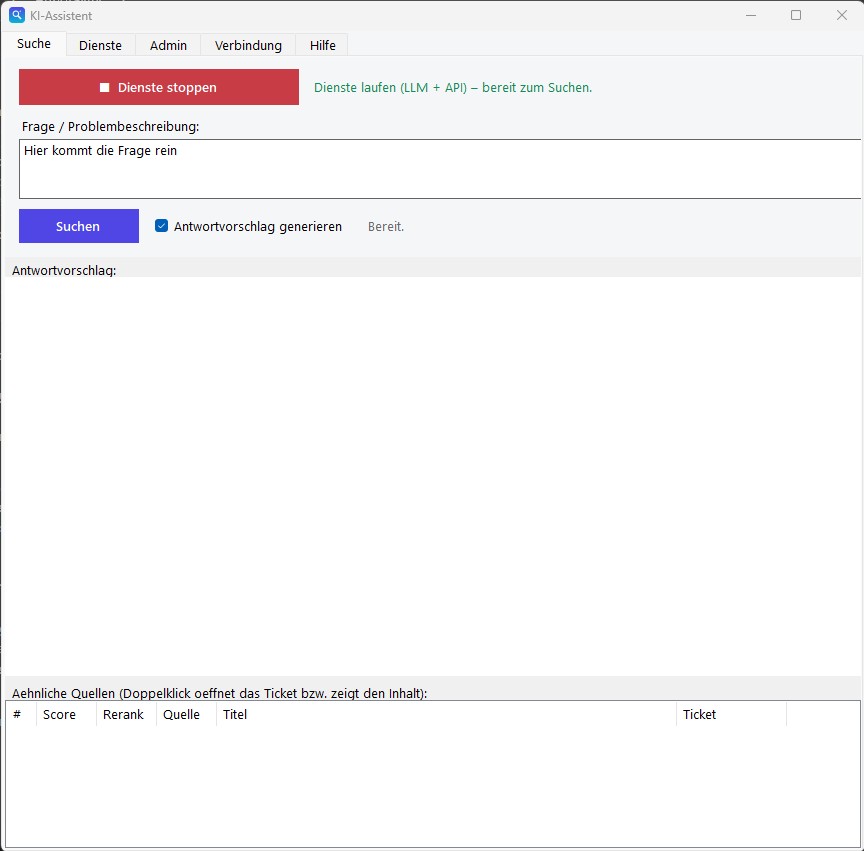
What is it for?
Many public authorities, companies and teams hold large, grown knowledge in documents: tickets, manuals, instructions, minutes, spreadsheets. Searching them is tedious, and the right answer is often known only by an experienced colleague.
Cloud AI like ChatGPT & Co. would be helpful, but for sensitive or personal data it is off-limits – it would be transmitted to external servers. This is exactly where the SWX AI Assistant comes in: it brings convenient AI search and answers to your own documents without a single byte leaving your computer. Think of it as “a ChatGPT for your internal documents, but everything stays on your own machine”.
What the tool can do
Convenient search and answers on your own documents – completely offline.
Read in your own documents
PDF, Word, Excel, PowerPoint, LibreOffice documents, e-mails (.eml/.msg incl. attachments), HTML, RTF, text/CSV/Markdown and OTRS ticket exports (JSON) are processed locally and made searchable – scanned PDFs and image files (PNG, JPG, TIFF) via built-in text recognition (OCR). Import folders can also be processed automatically on a schedule.
Intelligent search
Finds content by meaning, not just by keyword – complemented by a classic keyword search for technical terms, proper names and error codes.
AI answers with sources
A local language model writes a concise answer exclusively from the documents found and cites the source. If nothing fits, it says so honestly.
Freely selectable language model
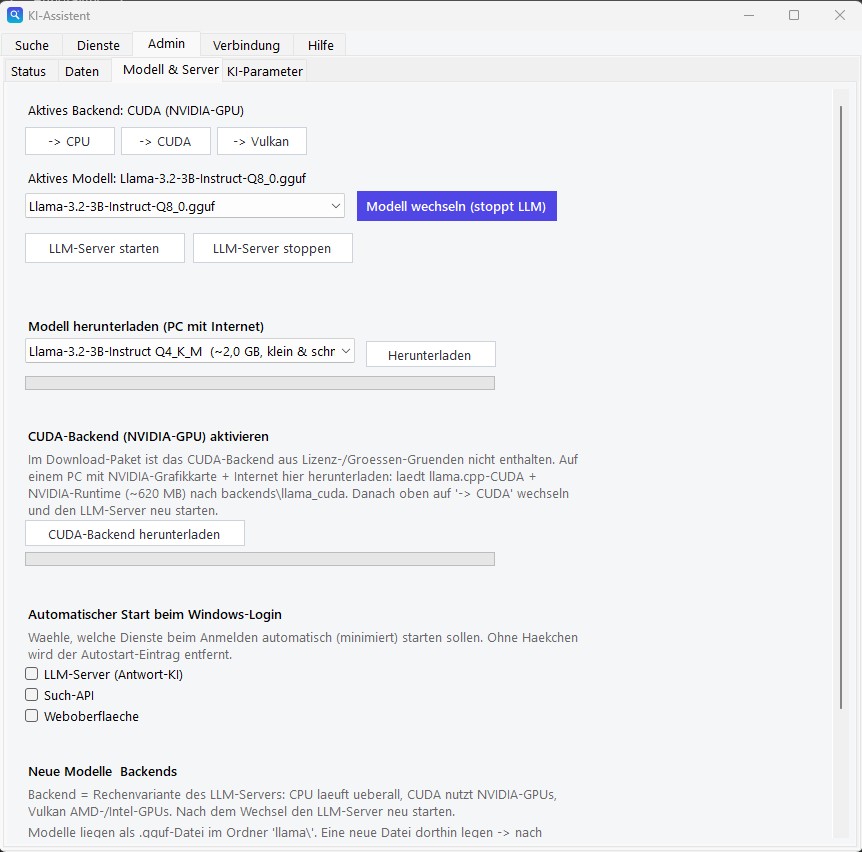
Uses virtually any local language model – from small and fast to large and especially accurate. Download at the touch of a button and switch any time.
Every hit is backed up
The original passages found are shown as well – you can always see what the answer is based on.
Setup wizard
A Windows program with a wizard that guides you step by step through the initial setup.
Shareable in a team
As a single workstation, as a small server for several workstations, or as a pure search client against that server.
Adaptable to the purpose
Profiles for “IT tickets”, “documents & manuals” or “mixed” set the appropriate wording of the answers.
Bilingual: German & English
The entire interface and help can be switched between German and English at a click (at the bottom of the sidebar) – your choice is remembered.
Topics kept cleanly separate
Different collections can be managed in separate “knowledge spaces” (e.g. “IT tickets” and “manuals”) and switched as needed – so topics don't get mixed up during search.
As a Windows service
The services can run as a real Windows service: automatic start at boot (even before login) and restart after a crash – ideal for a server that should always be available. Alternatively, a simple autostart at login.
Integration with other programs
Via a built-in HTTP API, other applications can ask questions and get answers back – the interface can be secured with a key if needed.
Instant answers via answer cache
Recurring questions are answered instantly: finished answers are remembered and automatically discarded as soon as data, model or settings change – outdated answers are impossible.
Turbo search for CPU systems
A switchable search backend with compressed (quantized) models noticeably speeds up search and import on CPU-only machines – at practically identical result quality.
Fast data updates
When re-importing large collections, only what is new or changed is processed – updates take minutes instead of hours. The import continues in the background with a progress display, even if the window is closed.
Modern reasoning models under control
Current “reasoning” language models (e.g. Qwen 3.5) are supported as well – the thinking mode can be controlled with a switch so answers stay fast and visible.
Ask follow-up questions
The next question may refer to the previous one (“And on Windows 10?”) – the assistant keeps searching in context, and the whole conversation stays visible like in a chat.
Measurable search quality
Rate answers with thumbs up/down, add good ones as test questions and re-measure the search at the push of a button – the benchmark also suggests the right relevance thresholds.
Spot missing documents
An optional report lists questions for which nothing suitable was found – showing which documents are missing. Stored locally only, with a retention period.
Automatic import and moving
New files in the import folder are processed on a schedule; entire knowledge rooms can be backed up and transferred to another machine – without re-importing.
New look, light & dark
A tidy interface with a sidebar and clear cards – light, dark or automatically matching your Windows setting.
Who and what for
Wherever knowledge sits in documents and data must not leave the computer.
“Have we had this before?”
Search past tickets and get solution suggestions instead of reinventing the wheel.
Query manuals
Query policies, instructions and manuals directly instead of leafing through page after page.
New employees
Find answers independently in the internal knowledge – without having to keep asking.
Document research
Search PDFs and reports specifically by content – by meaning, not just by keyword.
Particularly suited to public authorities and administration, companies with sensitive data, IT departments and small teams without their own AI infrastructure.
How it works – in 3 steps
All steps run on your own computer. No internet required (except once to download a language model).
1 · Read in documents
The tool breaks each file into meaningful sections and stores them locally in a searchable form – a kind of “meaning map”.
2 · Ask a question
For a question, the tool finds the most fitting sections – by meaning and keywords – and ranks them by relevance.
3 · Get an answer
A local AI language model summarises the answer from exactly those sections and cites the source.
This principle has a technical name: RAG – Retrieval-Augmented Generation. The language model does not know your documents and is never trained on them – the knowledge stays exclusively in the local database, and per question the model only sees the retrieved excerpts. That is why new documents can be queried right after import, with no training at all – and nothing leaves your computer.
OTRS integration (optional)
If you use an OTRS ticketing system, you get a handy direct link: when the search finds a matching ticket, a double-click on the result is enough – and the complete original ticket opens directly in OTRS in the browser. So you jump in seconds from the AI search result to the full case with all details and history.
The address of your own OTRS server is stored once in the program (page “Administration → Connection”). The function is optional and only relevant for OTRS users – all other content (PDF, Word, Excel, text …) works independently of it.
Privacy & security
The most important promise: your data stays with you.
No cloud, no telemetry
Search and AI answers run completely locally – no external servers, no transmission in the background.
Data doesn't leave the computer
Ideal for personal or confidential content and for environments with no internet access at all.
Full control
Documents, search index and language model reside exclusively with the user – nothing is outsourced.
Made for public authorities
Developed with strict requirements for data minimisation and data sovereignty in mind.
Technical requirements
- Operating system: Windows 10/11 or Windows Server
- Hardware: a normal PC/server, recommended approx. 8 CPU cores and 16 GB RAM. Runs purely on the CPU – an expensive graphics-card server is not necessary.
- Optionally faster: with an NVIDIA graphics card (CUDA) or AMD/Intel GPU (Vulkan); the matching accelerator package can be loaded at the touch of a button.
- Internet: only needed once to download a language model – then fully operable offline.
Licence & costs
- Free for private individuals and small businesses – under the PolyForm Small Business License 1.0.0: free use, copying and distribution for private individuals, associations, educational institutions and organisations with fewer than 100 people and under USD 1 million in annual revenue.
- Licensable only above this size: larger companies need a paid licence for business use (enquiries via kreutzweb.de). The full licence text is included as LICENSE.txt.
- Built on established open-source software (incl. llama.cpp, ChromaDB, sentence-transformers, FastAPI) – each under free licences (MIT/Apache/BSD). Includes software by David Giffin (xlrd, for old Excel files): “This product includes software developed by David Giffin <david@giffin.org>.”
- Models not included: the AI language model is conveniently downloaded via the program (on a PC with internet).
Setup in brief
- Download the package and unzip it into a folder.
- Start the program – a setup wizard guides you through all steps: base installation, operating mode, application profile, language model, start.
- Read in your own documents – done, ask questions.
No deep installation into the system, no administrator rights strictly required for operation – everything sits in one folder.
Frequently asked questions
What exactly is a RAG system?
RAG stands for Retrieval-Augmented Generation: for each question, the fitting passages are first retrieved from your own documents, then the language model writes the answer exclusively from them (generation). The SWX AI Assistant is exactly that – a full, locally running RAG system with meaning-based and keyword search, precision re-ranking (reranker) and source references.
Does my data leave the computer?
No. Search and AI answers run completely locally. There is no cloud connection and no telemetry. The only exception is the optional update notice: at most once a day it fetches a small version file from kreutzweb.de – without any content or identifiers – and can be switched off (off by default in the full package).
Do I need internet?
Only once, to download a language model. After that everything runs offline – only the optional update notice uses an internet connection if one is available.
Do I need an expensive graphics card?
No. The tool runs on a normal CPU. A GPU only accelerates optionally.
Which file formats can I import?
PDF, Word (.docx), Excel (.xlsx and old .xls), PowerPoint (.pptx), LibreOffice/OpenOffice (.odt, .ods, .odp), e-mails (.eml and Outlook .msg incl. attachments), HTML, RTF, text/CSV/Markdown and OTRS ticket exports (JSON). Scanned PDFs without a text layer and image files (PNG, JPG, TIFF) are made readable by text recognition (OCR) – locally, without any cloud service. Old Word and PowerPoint files (.doc, .ppt) are read if LibreOffice is installed.
Can I freely choose the language model?
Yes. You can integrate virtually any local language model and switch at any time. Larger models give better answers but need more power – you decide what fits your hardware.
Which languages is the program available in?
The interface can be switched between German and English (at the bottom of the sidebar); the choice is remembered.
Can I keep different topics separate?
Yes. Using knowledge spaces you can create several separate collections and switch between them – so, e.g., IT tickets and manuals don't get mixed up.
What does it cost?
For private individuals and small businesses, nothing: it is provided under the PolyForm Small Business License – free for fewer than 100 people and under USD 1 million in annual revenue. Larger companies need a paid licence for business use (enquiries via kreutzweb.de).
Can I use it in a team?
Yes. It can run as a small server on the network, and several workstations then access it.
Does the AI make up answers?
It is instructed to answer only from the documents found and to cite the source. If nothing fits, it says so honestly.
Are repeated questions answered faster?
Yes. The answer cache remembers finished answers – the same question is then answered instantly, with no waiting at all. If data, model or settings change, old entries automatically no longer apply; outdated answers are impossible. The cache can be disabled or cleared in the admin area.
Honest limitations
- It is not a cloud service and not an all-knowing chatbot: it answers only from your own, imported documents, not from general knowledge.
- The answer quality depends on the chosen language model and on the quality of the documents. Larger models answer better but need more power.
- On a pure CPU, answers are not real-time but take a few seconds depending on the model – recurring questions, however, are answered instantly thanks to the answer cache.
- Provided “as is”, without warranty and without guaranteed support – it is a free tool.
Download
There is a setup and two ZIP variants – identical in features, they only differ in how they are installed and what is already included in the package:
Setup – the easiest way for a single PC
Installs the program for the signed-in user without administrator rights, with a Start menu entry. To update, simply run the new setup – knowledge base, models and settings are kept. The AI models are fetched on first start (a few GB, once, internet required).
Download setup (approx. 82 MB)Compact ZIP – to unzip, for PCs with internet
Quick download. The AI models are fetched automatically on first start (a few GB, once, internet required). After that everything runs locally and offline.
Download KI-Bundle-Lite.zip (approx. 111 MB)Complete – for machines without internet access
Contains all AI models and program libraries. For air-gapped networks and government environments: after setup no internet access is needed at all – not even on first start.
Download KI-Bundle.zip (approx. 3.7 GB)Security & verifiability
The program files are digitally signed with a certificate issued to Daniel Kreutz (Certum) – Windows shows the publisher on launch. Independently scanned at VirusTotal:
- KI-Assistent-Setup-1.8.2.exe (setup)
- KI-Bundle-Lite.zip (the complete package)
- KI-Assistent.exe (the program itself)
- SwxService.exe (service component)
A note for reviewers: the package ships the libraries of the open-source project llama.cpp unmodified. These are not signed by their authors – some scanners flag unsigned libraries on principle. In addition, the program deliberately starts local background services and can download models; that too triggers some scanners. Using the SHA256 checksums above you can verify at any time that your download is unaltered.
Installation: run the setup – or download the ZIP, unzip it into any folder and run KI-Assistent.exe. No deep installation into the system needed.
The program files are digitally signed with a certificate issued to
Daniel Kreutz; Windows shows the publisher on launch. You can also
verify your download with the SHA256 checksums (in the command prompt:
certutil -hashfile KI-Bundle-Lite.zip SHA256).
Free for private individuals and small businesses (PolyForm Small Business License),
provided “as is” without warranty.
Did this tool help you? Treat me to a coffee via PayPal